A Better Image Upload Flow for Alt Text and SEO
Learn how to collect image alt text during upload, store image metadata, and improve image SEO with a cleaner CMS upload flow.
Many teams still treat an image as a plain URL. An editor uploads a file, the backend returns an OSS address, and the content record saves that string. The image can be shown on the page, but its meaning is often missing. That is where `alt` text gets lost.
A better approach is simple: collect `alt` text during upload, store the image in a dedicated `resources` table, and let the frontend read both the image URL and the description from the same source.
1. What Goes Wrong with Basic Image Upload
Images are often saved as URLs only
In many content systems, the upload flow ends as soon as the file is saved. The backend stores the file location, and the business table keeps only the image reference. This is enough to show the image, but not enough to describe it.
Alt text is easy to miss
When `alt` text is not part of the upload step, it often gets pushed aside. Editors may forget it, fill it in later, or never add it at all. That usually leads to one of three outcomes:
- - `alt` text is forgotten because it lives outside the upload step
- - `alt` text is added inconsistently across different pages
- - frontend code falls back to an empty or generic `alt`
This is a data problem, not only a UI problem
This issue is not only about frontend rendering. It starts earlier, in the upload flow and the data model. If the system only collects the file, it only stores the file. The description never becomes part of the content record.
2. A Better Way to Upload Images
Start with an upload button on the page
The page can still begin with a simple `Upload Cover Image` button. That keeps the editing interface familiar and easy to use.

Open a modal to upload the image
After the editor clicks that button, the system can open a modal instead of starting the upload right away. This small change gives the upload flow more structure and makes room for extra image fields.
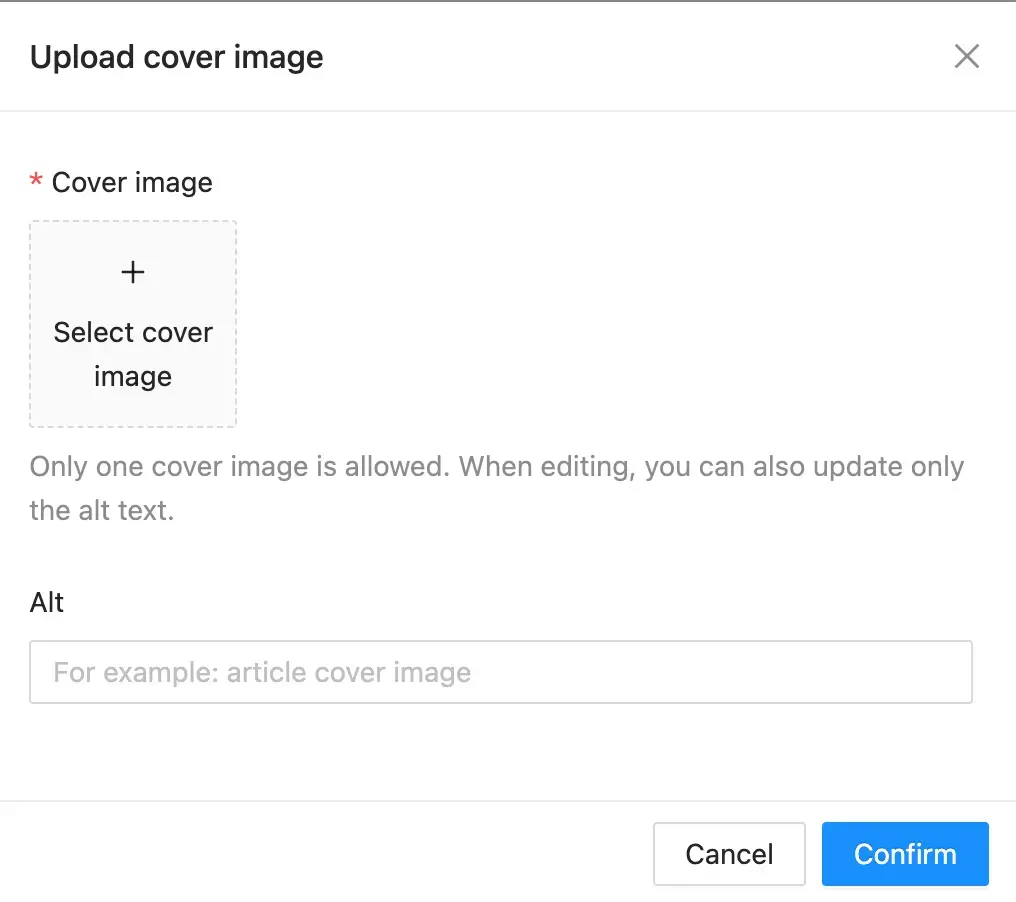
Ask for the image and alt text together
In the modal, the editor should complete two things together:
- - select the cover image
- - enter the `alt` text
This turns upload into more than a file action. It becomes a content step. The image file and the image description enter the system at the same time. When editing an existing image, the same flow can also support `alt`-only updates without uploading a new file.
3. How Alt Text Moves Through the System
Send the file and alt text in one request
Once the modal collects both fields, the upload request should send both together. A common pattern is `multipart/form-data`, where the file is uploaded as binary data and `alt` is sent as a normal field.
That means `alt` is no longer a last-minute frontend detail. It becomes part of the backend contract from the start.
Save the image in a `resources` table
the image should not be saved as a plain string in the business table. A better design is to store the uploaded image in a dedicated `resources` table.
In this table, the image can keep the fields that belong to the resource itself:
id CHAR(36) PRIMARY KEY
resource_type ENUM('image', 'video') NOT NULL
oss_url VARCHAR(1024) NOT NULL
resource_name VARCHAR(255) NOT NULL UNIQUE
alt TEXT NULL
This keeps the media fields together. The file location, unique resource name, and `alt` text all live in one place.
Link `content_entries` to `resources`
The business table can then reference that media record through `cover_resource_id`:
cover_resource_id CHAR(36) NULL
That creates a clean relationship between the content record and the image resource:
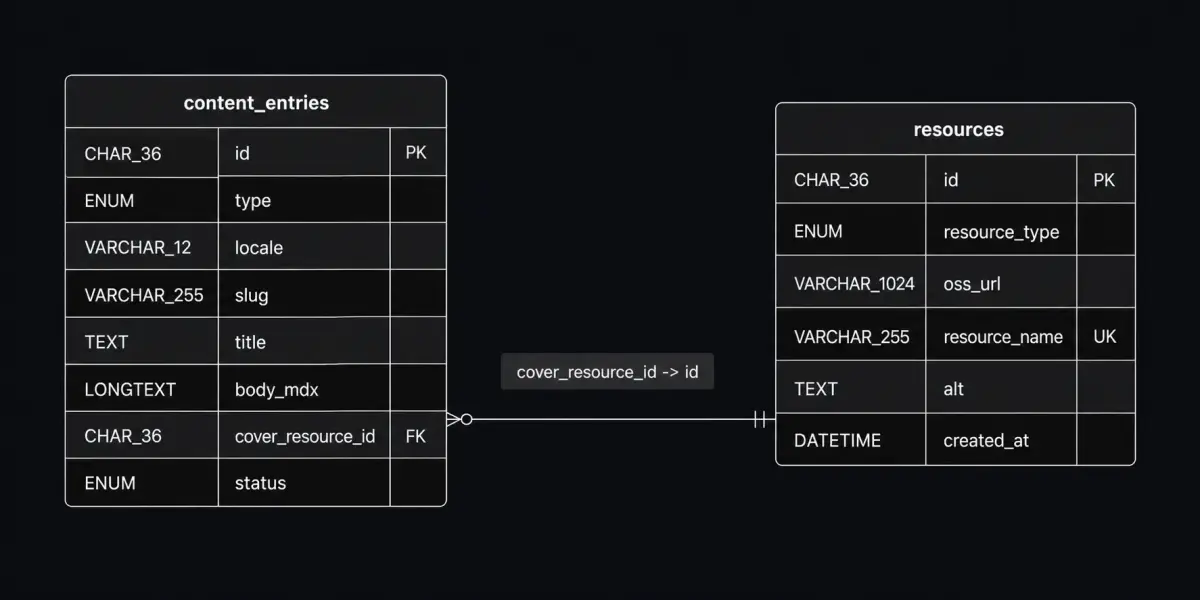
In this model, `content_entries` focuses on business content, while `resources` focuses on media data.
4. How the Frontend Shows the Image
Read the image URL from `resources`
When the page needs to show the cover image, it should read the image URL from the related resource record.
Read the alt text from `resources`
The page should also read the `alt` text from that same record. In simple terms:
- - `src` comes from `resources.oss_url`
- - `alt` comes from `resources.alt`
Render both `src` and `alt` together
That produces a more complete image node:
type Resource = {
  ossUrl: string;
  alt: string | null;
};


function CoverImage({ resource }: { resource: Resource | null }) {
  if (!resource) return null;


  return (
    <img
      src={resource.ossUrl}
      alt={resource.alt || ""}
    />
  );
}
This is the key benefit. The frontend is not guessing or rebuilding image meaning at render time. It is using data that was captured during upload and saved with the resource.
5. Why This Is Better for SEO and Content Teams
Better alt text for SEO and accessibility
This approach makes it much more likely that useful `alt` text reaches production pages. That helps search engines understand the image better, and it also supports users who rely on assistive technology.
Cleaner data structure
Separating `content_entries` and `resources` creates a cleaner model. Business content stays in one table. Media data stays in another. That makes the system easier to maintain and extend later.
Easier to manage and update later
Editors can check whether `alt` is set, update only the description when needed, and manage cover images more clearly over time.
The main idea is simple:
- - upload the image and `alt` text together
- - save the image in `resources`
- - link the content record through `cover_resource_id`
- - render both `src` and `alt` on the frontend
Once an image is treated as content with metadata, not just a URL, SEO and content management both get better.